
[android] GoogleMAP SDKで線(PolyLine)を引く
目次
GoogleMAP SDKで線(PolyLine)を引く
GoogleMAPのPolyLineの引き方
@Override
public void onMapReady(GoogleMap googleMap) {
    mMap = googleMap;
    PolylineOptions rectOptions = new PolylineOptions()
            .add(new LatLng(37.35, -122.0))
            .add(new LatLng(37.45, -122.0))
            .add(new LatLng(37.45, -122.2))
            .add(new LatLng(37.35, -122.2))
            .add(new LatLng(37.35, -122.0));

    Polyline polyline = mMap.addPolyline(rectOptions);
}
もしくは
private ArrayListlocationList; @Override public void onMapReady(GoogleMap googleMap) { mMap = googleMap; locationList.add(new LatLng(37.35, -122.0)); locationList.add(new LatLng(37.45, -122.0)); locationList.add(new LatLng(37.45, -122.2)); locationList.add(new LatLng(37.35, -122.2)); locationList.add(new LatLng(37.35, -122.0)); PolylineOptions rectOptions = new PolylineOptions() .addAll(locationList); Polyline polyline = mMap.addPolyline(rectOptions); }
PolyLineの幅や色の変更
.colorや.widthでPolyLineの幅や色の変更ができる
    PolylineOptions rectOptions = new PolylineOptions()
                .width(25)
                .color(Color.BLUE)
                .addAll(locationList);
PolyLineに輪郭をつける
以下の様に2つのPolyLineを重ねることで輪郭があるPolyLineを表現できる
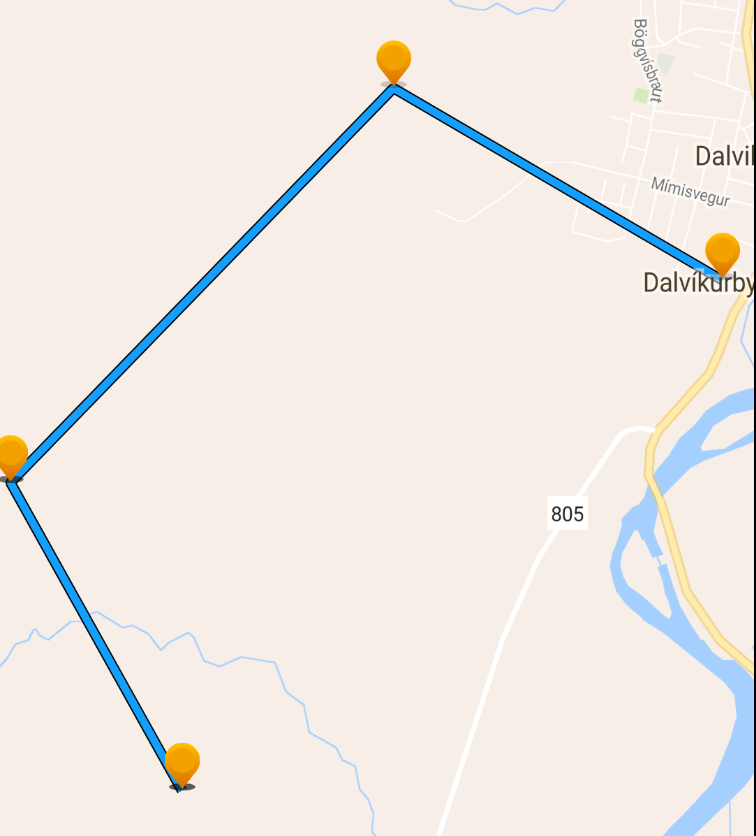
int strokeColor = ContextCompat.getColor(getActivity(), R.color.polylineStrokeColor);
        int fillColor = ContextCompat.getColor(getActivity(), R.color.polylineFillColor);

        int strokewidth = getResources().getInteger(R.integer.POLYLINE_STROKE_WIDTH_IN_PIXELS);
        int fillwidth = getResources().getInteger(R.integer.POLYLINE_FILL_WIDTH_IN_PIXELS);

        // strokeに見せかけるpolylineを描画する
        PolylineOptions strokeOptions = new PolylineOptions()
                .width(strokewidth)
                .color(strokeColor)
                .addAll(positions);

        // fillに見せかけるpolylineを描画する
        PolylineOptions fillOptions = new PolylineOptions()
                // strokeのwidth分細らせて、strokeに見せかけるpolylineが見えるようにする
                .width(strokewidth - fillwidth*2)
                .color(fillColor)
                .addAll(positions);

        googleMap.addPolyline(strokeOptions);
        googleMap.addPolyline(fillOptions);
integar.xml
    15
    2
color.xml
    #FF14a0ff
    #FF000000