[swift4] AdmobのバナーをTableViewの指定行に追加する
目次
AdmobのモジュールをPodでインストール
podファイルに以下のコードを追加し、”pod install”
pod 'Google-Mobile-Ads-SDK'
StoryBoard部分
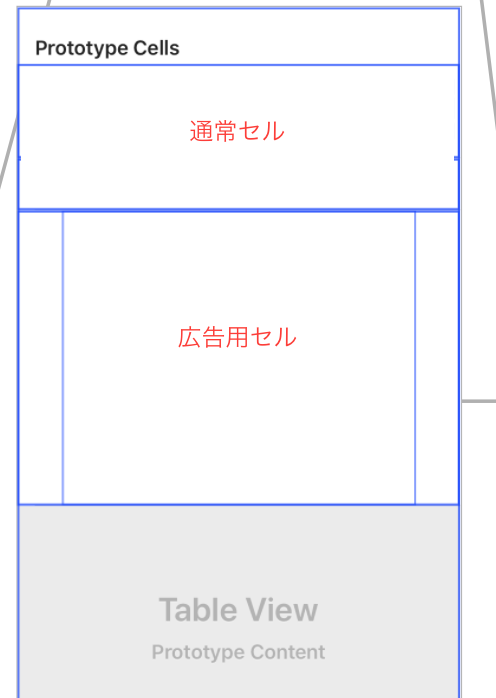
ViewContollerにTableViewを配置し、TableViewにCellを通常用セルと広告用セルを追加。
通常Cellは「cell」、広告用Cellは「ADcell」というIDを付与しておく。
ADcell上には広告サイズに合わせた通常Viewを配置し、tag20を設定。
*もっと良い方法があるはずだが。。。
ViewController.swift
import UIKit
import CoreData
import GoogleMobileAds

class FViewController: UIViewController, UITableViewDelegate, UITableViewDataSource {

 @IBOutlet weak var tableView: UITableView!

 //Admob
 var bannerView: GADBannerView!
 let adUnitID = "UnitIDを入力"
 let AdInsertPositionArray = [3,15,25,35,45] //3行目、15行目、25行目・・にGADBannerViewを挿入

 let cellHeight = 90
 let cellHeightForAD = 250

 //要素
 var posts:[Dictionary<String, String>]! //本番データ
 var TempPosts:[Dictionary<String, String>]! //本番データにappendする前のデータ

 //MARK: didload
 override func viewDidLoad() {
 super.viewDidLoad()

 tableView.dataSource = self
 tableView.delegate = self

 //要素(Posts)を読み込むコードを何らか実装

 TempPosts = [] //初期化

 insertAD()

 loadAd()

 }


 //MARK: TableView Method
 func tableView(_ tableView: UITableView, numberOfRowsInSection section: Int) -> Int {
  return posts.count
 }


 func numberOfSections(in tableView: UITableView) -> Int { // sectionの数を決める
 return 1
 }

 func tableView(_ tableView: UITableView, heightForRowAt indexPath: IndexPath) -> CGFloat {

 if posts[indexPath.row]["id"] == "ad" {
  return CGFloat(cellHeightForAD) //広告用のセルの高さ
 }

  return CGFloat(cellHeight)
 }

 //MARK: cellSetting
 func tableView(_ tableView: UITableView, cellForRowAt indexPath: IndexPath) -> UITableViewCell {

 let row = indexPath.row

 //GoogleAd
 if posts[row]["id"] == "ad" {
  let cell = tableView.dequeueReusableCell(withIdentifier: "ADcell", for: indexPath)
  let baseView = cell.contentView.viewWithTag(20) as! UIView
  baseView.addSubview(bannerView) //baseViewに広告を追加

  return cell
 }

 //通常のセル
 let cell = tableView.dequeueReusableCell(withIdentifier: "cell", for: indexPath)

 return cell
 }

 return cell

 }


 //MARK: Selected Cell
 func tableView(_ tableView: UITableView, didSelectRowAt indexPath: IndexPath) {

 let cell = tableView.cellForRow(at: indexPath)
 if cell?.reuseIdentifier != "cell" { //通常セルかどうか判定
  return
 }
  //通常のセルがタップされた時の処理
 }

 func insertAD(){
 for pos in AdInsertPositionArray {
  if TempPosts.count>pos {
   TempPosts.insert(["id":"ad"], at: pos) //広告パートを要素に挿入
  }
 }


}
GADBannerViewDelegate部分
import Foundation
import GoogleMobileAds

extension ViewController:GADBannerViewDelegate{

 func loadAd(){

 bannerView = GADBannerView(adSize: kGADAdSizeMediumRectangle) //320x250
 //bannerView = GADBannerView(adSize: kGADAdSizeBanner) //320x50
 bannerView.adUnitID = adUnitID
 bannerView.rootViewController = self
 bannerView.load(GADRequest())
 bannerView.delegate = self
 }

 /// Tells the delegate an ad request loaded an ad.
 func adViewDidReceiveAd(_ bannerView: GADBannerView) {
 print("adViewDidReceiveAd")
 //bannerBaseView.addSubview(bannerView)
 //bannerBaseView.isHidden = false
 }

 /// Tells the delegate an ad request failed.
 func adView(_ bannerView: GADBannerView,
 didFailToReceiveAdWithError error: GADRequestError) {
 print("adView:didFailToReceiveAdWithError: \(error.localizedDescription)")
 //bannerBaseView.isHidden = true
 }

 /// Tells the delegate that a full-screen view will be presented in response
 /// to the user clicking on an ad.
 func adViewWillPresentScreen(_ bannerView: GADBannerView) {
 print("adViewWillPresentScreen")
 }

 /// Tells the delegate that the full-screen view will be dismissed.
 func adViewWillDismissScreen(_ bannerView: GADBannerView) {
 print("adViewWillDismissScreen")
 //bannerBaseView.isHidden = true
 }

 /// Tells the delegate that the full-screen view has been dismissed.
 func adViewDidDismissScreen(_ bannerView: GADBannerView) {
 print("adViewDidDismissScreen")
 //bannerBaseView.isHidden = true
 }

 /// Tells the delegate that a user click will open another app (such as
 /// the App Store), backgrounding the current app.
 func adViewWillLeaveApplication(_ bannerView: GADBannerView) {
 print("adViewWillLeaveApplication")
 //bannerBaseView.isHidden = true
 }
}