[swift] カスタムセルを使用しないで、tableviewのセルをカスタマイズする
目次
カスタムセルを使用しないで、tableviewのセルをカスタマイズする
tableviewのセルをカスタマイズするときにカスタムセルを使用してカスタマイズすることはよくあるが、
超単純な構成なのにいちいちカスタマイズセルを作るのが億劫なときにはカスタムセルを使用せずに
セルをカスタマイズすることができる
セルのIdentifier設定
StoryBoard上でカスタムしたいセルを選択し、Identifier欄に「Cell」と設定
ラベルを配置し、タグ設定
セル上に置きたいオブジェクト(今回はUILabel)を配置し、それぞれにタグを設定する
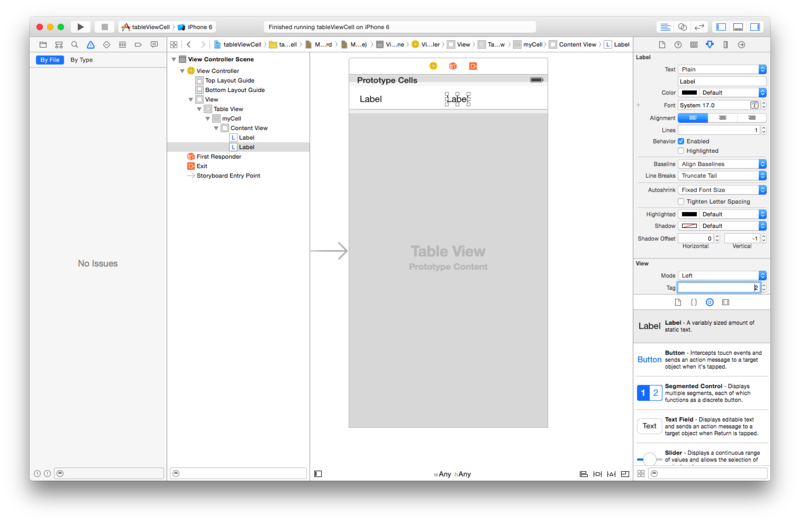
tableView
cell.viewWithTag(タグ番号)でセル上のオブジェクトにアクセスできる
class ViewController: UIViewController, UITableViewDataSource, UITableViewDelegate {

    override func viewDidLoad() {
        super.viewDidLoad()
    }

    func tableView(tableView: UITableView, numberOfRowsInSection section: Int) -> Int {
        return 1
    }

    func tableView(tableView: UITableView, cellForRowAtIndexPath indexPath: NSIndexPath) -> UITableViewCell {
        let cell = tableView.dequeueReusableCellWithIdentifier("Cell") as UITableViewCell

        var label1 = cell.viewWithTag(1) as UILabel
        label1.text = "ラベル1"

        var label2 = cell.viewWithTag(2) as UILabel
        label2.text = "ラベル2"

        return cell

    }
}